Overview
Azure Data Lab Toolkit is a PowerShell project for creating repeatable data labs in Azure. Its purpose is to bring infrastructure, databases, sample data, assessment, community tools, testing, cost controls, and teardown into one understandable workflow.
The first implementation target is SQL Server on Azure VM. That target gives the project a demanding proving ground for identity, networking, storage, guest configuration, software installation, testing, and cleanup before the same core is extended to managed data services.
Intended experience
Section titled “Intended experience”The intended workflow starts with a schema-validated YAML file:
- Select a template or describe a lab.
- Validate prerequisites, permissions, regions, quotas, and policy.
- Review a deterministic plan, an Azure-aware comparison, and an explicit cost estimate.
- Review the target’s secret-store decision and, for a VM, its administrative-access decision.
- Run applicable assessment without treating assessment as migration or a prerequisite for every earlier review step.
- Confirm any sensitive-data or destructive operation.
- Deploy through PowerShell initially; Bicep and Terraform follow before Fabric delivery.
- Load approved sample, community, generated, private, local, or URL-based data.
- Install approved software and solution packs.
- Probe the environment and export an HTML evidence report.
- Shut down, resume, or remove the lab with lifecycle guardrails.
Templates, command-line flags, and a guided browser wizard serve different experience levels without creating different underlying behaviors.
Plan and WhatIf
Section titled “Plan and WhatIf”The command design gives Plan and WhatIf different jobs:
New-AzureDataLabPlanis current. It works without Azure access, validates YAML, and explains defaults, derived values, desired resources, actions, policy findings, and guardrails.-WhatIfruns after Azure sign-in. It compares the resolved plan with live resources and reports create, reuse, update, replace, conflict, drift, or no-change without making changes.
Both are implemented. Test-AzureDataLabWhatIf reconciles a compiled plan
against live state using native ARM WhatIf. The remaining proof point is
verification against a real subscription, which has not happened yet.
Architecture at a glance
Section titled “Architecture at a glance”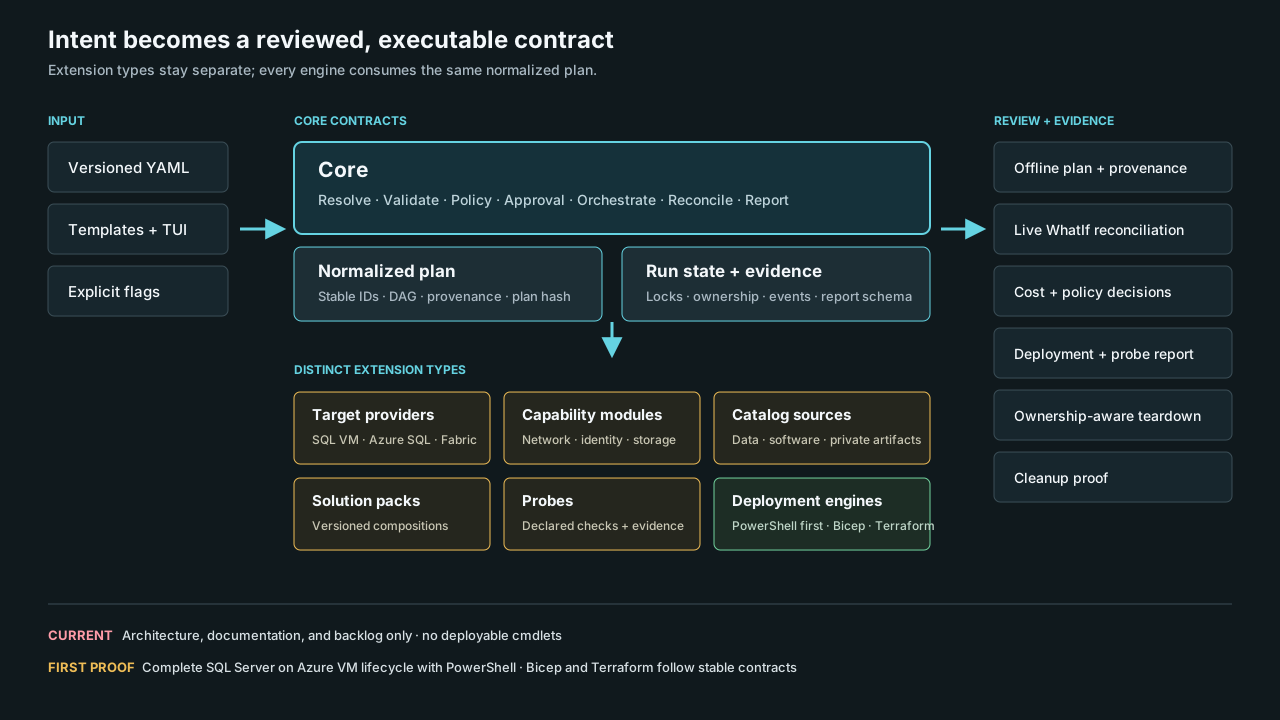
The design separates reusable decisions from target-specific behavior:
- Core owns configuration, validation, planning, policy, run state, reporting, and lifecycle controls.
- Target providers understand deployable platforms such as SQL Server on Azure VM, managed or self-hosted PostgreSQL, or Microsoft Fabric.
- Capability modules connect supporting services such as Key Vault, Bastion, storage, Git, identity, assessment, and cost data.
- Catalog sources describe governed data, software, and templates; solution packs compose them into scenarios.
- Deployment engines translate approved actions; probes verify outcomes and create evidence.
Read Architecture Overview for the full model.
Delivery direction
Section titled “Delivery direction”SQL VM is followed by Azure SQL Database and SQL Managed Instance. The project then delivers managed PostgreSQL, PostgreSQL on an Azure VM, and containerized PostgreSQL before adding Bicep, Terraform, and the broader Git and CI/CD adapters. Fabric follows those segments, then Databricks and later platforms.
Every target and solution pack must state whether it will deploy or reuse Key Vault, use an approved external secret store, or explain why no secret store applies. Every Azure VM defaults to Azure Bastion with no public IP unless a reviewed plan explicitly approves another administrative-access decision.
Read the Roadmap for the full S0-S22 delivery plan and quality gates.
Project relationship
Section titled “Project relationship”Azure SQLVM Toolkit is an unfinished predecessor and a source of lessons for the new architecture. Its published documentation remains online as a record of that work.
Azure Data Lab Toolkit is a new repository and design. Features from the older toolkit are not automatically available here.
Reading status correctly
Section titled “Reading status correctly”Published releases and release notes will be authoritative for Available behavior. The repository shows current artifacts, the architecture records committed design, and the roadmap records backlog, exploratory, and deferred work. Read Project Status for the full vocabulary.
Where to go next
Section titled “Where to go next”- Project Status separates current work from planned capabilities.
- Try The Alpha runs the current commands locally.
- Pitch Deck presents the idea in a meeting-friendly format.
- Roadmap shows the dependency path.
- Suggest a Project explains how maintainers can propose tools or data sources.